Three years ago, a developer’s stack was mostly about frameworks and databases. Today, it’s about AI at every layer.

Three years ago, a developer’s stack was mostly about frameworks and databases. Today, it’s about AI at every layer.
In 2026, the tools developers use to plan, design, code, test, and deploy have all changed. Not because the old ways stopped working, but because AI has made every stage faster, cheaper, and more accessible than it’s ever been.
According to the Stack Overflow Developer Survey 2025, 84% of developers are now using or planning to use AI tools up from 76% the year before. That’s not a trend. That’s a shift.
This article breaks down the modern developer stack in 2026: what tools developers are actually using, how AI fits into each stage of the workflow, and what’s genuinely changed compared to just a few years ago.
Here’s how the stack breaks down by stage:
| Stage | What Developers Use |
| Planning & Ideation | ChatGPT, Claude |
| Design & UI | v0 by Vercel, Figma AI |
| Coding | Cursor, GitHub Copilot, Windsurf |
| Testing | Qodo, CodeRabbit |
| Deployment, Cloud Management | Kuberns Agentic AI |
| Monitoring | Datadog |
Each stage now has an AI-native option. That’s what’s new. Let’s walk through each one.
Before, planning meant writing specs in Notion and hoping everyone agreed. In 2026, developers use AI to think through the idea before touching code.
ChatGPT (GPT-4o) is the go-to for breaking a vague idea into a concrete feature list, writing user stories, or stress-testing assumptions. Claude is better for longer planning sessions, when you need to paste in existing docs, find gaps in requirements, or work through a complex technical decision.
What’s changed: Developers who used to spend days on requirements docs now do the same work in hours, with AI as a thinking partner. The planning stage is no longer a bottleneck.
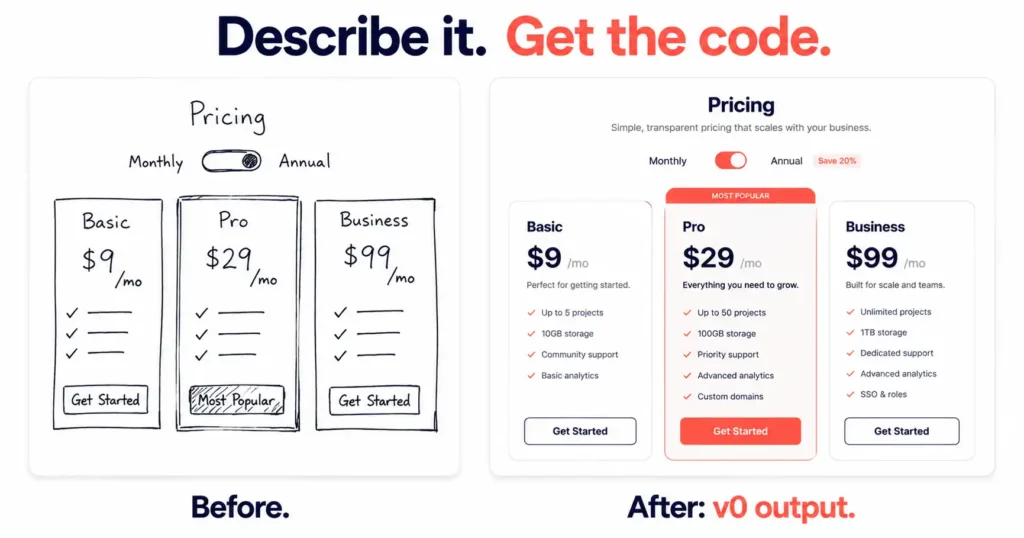
This is the most underrated change in the 2026 stack.
v0 by Vercel lets you describe a UI component in plain English and get back production-ready React + Tailwind code. Pricing page with three tiers? Working login form? Full dashboard layout? You describe it, v0 builds it, you paste it in. That’s it.
Figma AI handles the iteration side, auto-generating layout options, suggesting components, and helping you prototype flows before writing any production code.
What’s changed: A solo developer or small team can now ship polished UI without a dedicated designer. The gap between “I know what to build” and “I’m building it” has collapsed.
This is where most developers first encountered AI tooling, and it’s evolved the most.
Cursor is the current leader for serious project work. It holds your entire codebase in context, which means it catches cross-file issues and gives suggestions that actually understand how your project is structured, not just the file you have open.
GitHub Copilot is still the most beginner-friendly option, especially if you’re already in VS Code. It’s smoother to set up and works well for standard patterns and boilerplate.
Windsurf is worth knowing for rapid prototyping, when you want to move fast without friction.
| Tool | Best For | Price |
| Cursor | Full-project context, complex work | $20/mo |
| Windsurf | Rapid prototyping | $10/mo |
| GitHub Copilot | Beginners, VS Code users | $10/mo |
What’s changed: AI coding tools in 2023 were autocomplete. In 2026, they handle entire features. The developer’s job has shifted from writing every line to reviewing, directing, and refining what AI produces.
“If you want a deeper breakdown of how each tool fits into a real workflow, this guide to the best AI tools stack for developers covers every stage with honest trade-offs and pricing.”
This used to be the stage everyone skipped when time was short. In 2026, AI makes it harder to justify skipping.
Qodo (formerly CodiumAI) generates test cases automatically based on your code. It analyzes what your functions actually do and produces test coverage without you writing tests from scratch.
CodeRabbit does AI-powered code review on pull requests, flagging issues, suggesting improvements, and adding context that most human reviewers miss on a quick pass.
What’s changed: Test coverage is no longer a nice-to-have that gets cut when the deadline moves. AI handles the grunt work. Developers who use these tools ship with fewer bugs and fewer 2 AM incidents.
This is where the biggest quality-of-life improvement has happened in the last two years.
In 2023, deploying a real production app still meant dealing with Docker configs, environment variable mismatches, SSL setup, and a mental model of how your cloud provider worked. Developers who weren’t DevOps engineers wasted hours on infrastructure that had nothing to do with their product.
In 2026, AI-native deployment platforms handle all of that automatically. You push to GitHub. The platform detects your stack, builds it, handles SSL, and scales it. No YAML. No Dockerfile debugging. No ops team required.
Kuberns go further with agentic deployment, the platform manages environments, scaling, and infrastructure decisions automatically, so developers stay focused on the product.
What’s changed: Deployment is no longer a skill gate. A developer who’s never touched a server can go from working code to live production URL in minutes.
Monitoring used to be something teams bolted on after launch (or after their first outage). In 2026, it’s expected from day one.
Grafana and Datadog are the two most common choices. Grafana is open-source and cost-effective for teams that want flexibility. Datadog is more opinionated and easier to get running quickly, with AI-assisted root cause analysis built in.
The entry point for both is OpenTelemetry, the open standard for instrumentation that most frameworks now support out of the box.
What’s changed: Observability has become a baseline expectation, not an advanced feature. AI tools like Datadog’s Watchdog surface anomalies automatically, so teams spend less time hunting through logs and more time fixing real problems.
All of this AI tooling sits on top of a foundation that hasn’t moved much: Git is still how code is tracked and collaborated on. Every tool in the stack above integrates with it.
PostgreSQL is still the default answer for most database needs. Extensions like pgvector have added vector search natively, which means it now handles AI-powered search workloads too.
TypeScript has quietly become the default for serious JavaScript projects. The State of JS 2025 survey confirmed TypeScript-first is now standard, not optional.
The terminal still matters. Developers who are comfortable with the command line move faster and debug more effectively than those who aren’t regardless of how good their AI tools are.
The fundamentals haven’t been replaced. They’ve just got faster tools on top.
This isn’t just for senior engineers with years of experience. That’s the real shift in 2026.
A solo developer with a clear idea, the right AI stack, and a few months of time can now ship what used to require a funded team. The ceiling for what one person can build has never been higher.
The developer who wins in 2026 isn’t the one who knows the most tools. It’s the one who picks the right tool for each stage, learns to direct AI effectively, and ships instead of configuring.
The modern developer stack in 2026 is AI-assisted at every layer. Planning, design, coding, testing, deployment, and monitoring all have tools that would have seemed like science fiction five years ago.
What’s changed is speed. What hasn’t changed is that the best developers still ship things, review what they build, understand their systems, and iterate based on real feedback.
The tools got better. The fundamentals still matter. The combination of both is what the modern developer stack actually looks like in 2026.
Published On: May 19, 2026
Last Updated : May 19, 2026

Leading AI News from Top Experts & Innovators!
Get the Latest AI News & Trends!